

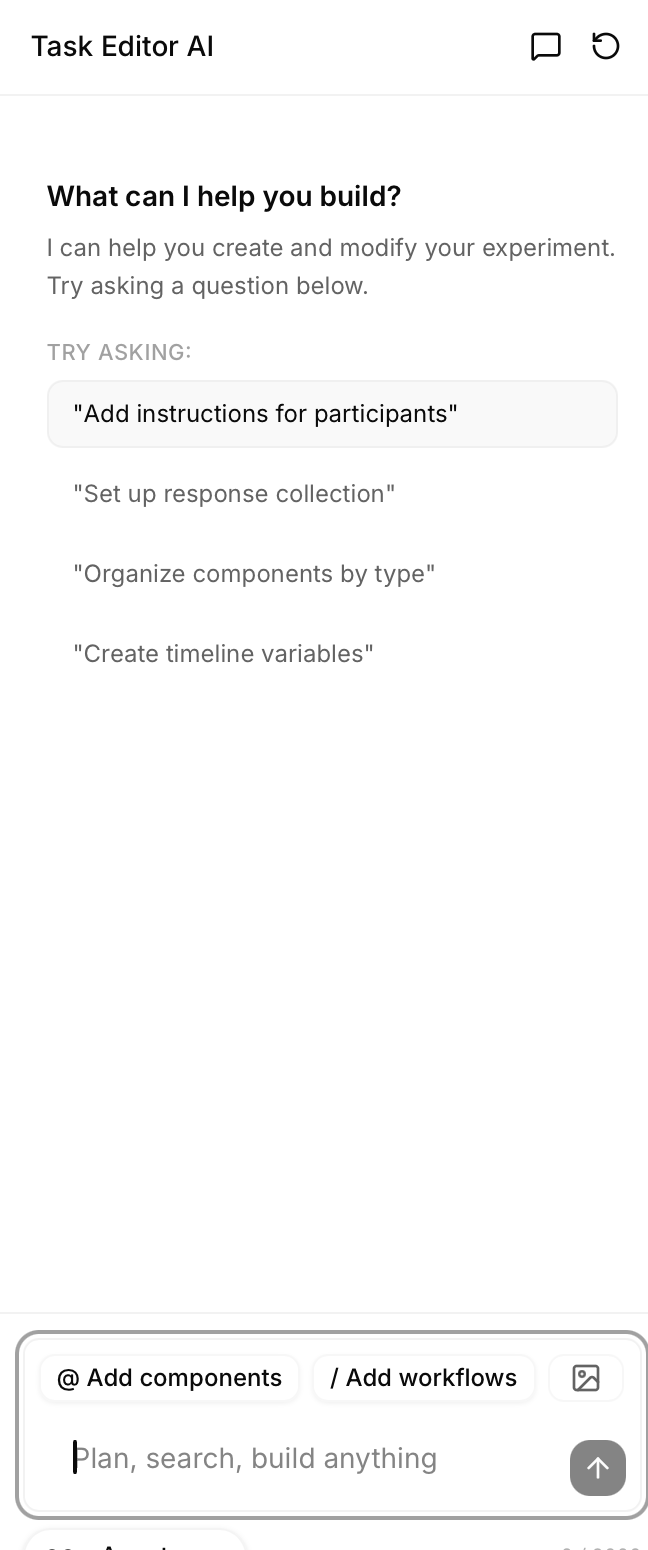
AI Assistant
The AI Assistant helps you build experiments faster using natural language descriptions. Describe what you want in plain English, and the AI creates components, modifies settings, and provides research-backed methodology guidance.Overview
The AI Assistant can:- Create complete experiments from descriptions - “Create a Stroop task” → full experiment structure
- Modify existing components - “Change all fixations to 1000ms” → bulk updates
- Add new components - “Add instructions explaining the task” → inserts component with content
- Answer methodology questions - “How many trials for a Stroop task?” → research guidance
- Suggest improvements - Reviews your experiment and recommends enhancements
- Save time building experiments
- Learn experiment design best practices
- Get research-backed recommendations
- Iterate quickly on experiment designs
- Build complex structures with simple requests
What the AI Can Do
Create Complete Experiments
Describe the experiment type, and AI generates the full structure. Example requests:- “Create a Stroop task with 160 trials”
- “Build a 5-question mood questionnaire”
- “Design a visual search experiment”
- “Make a 2-alternative forced choice task”
- Instructions - Welcome message and task explanation
- Component structure - Appropriate sequence (fixation → stimulus → response → feedback)
- Timeline configuration - Research-backed timing defaults
- Variables - Trial-by-trial parameters (for multi-trial tasks)
- Frames - Loops and randomization where appropriate
- Consent form component
- Task instructions component
- Practice trials (5 trials with feedback)
- Begin main task transition
- Fixation component (500ms)
- Stimulus component (word display, 2000ms)
- Response component (F/J keys)
- Feedback component (1000ms, errors only)
- Loop frame (160 trials)
- Timeline variables (160 rows: word, color, congruency, correctKey)
- Debrief component
Modify Existing Components
Change properties across one or many components. Single component modifications:- “Change the fixation duration to 1000ms”
- “Make the button blue”
- “Add a border to the image”
- “Change all fixations to 1000ms”
- “Make all buttons the same size”
- “Update all text to 18px font”
- “For the Stroop stimulus component, change word duration to 1500ms”
- “In the consent form, change button text to ‘I Agree’”
- “Add a minimum view time of 3 seconds to the consent form”
- “Set response timeout to 2000ms for all response components”
Add New Components
Insert components into existing experiments. Adding specific components:- “Add instructions explaining the task”
- “Add a break screen every 50 trials”
- “Add a practice trial before the main task”
- “Add a thank you message at the end”
- Appropriate component type for request
- Content for the component
- Where to insert in sequence
- How to connect to existing flow
- AI creates Instruction component
- Writes explanation of Stroop task
- Inserts before practice trials
- Adds “Continue” button
Answer Methodology Questions
Get research-backed advice on experimental design. Common questions:- “How many trials do I need for a Stroop task?”
- “What’s the standard fixation duration?”
- “Should I use blocked or randomized design?”
- “What’s a good inter-trial interval?”
- “How long should stimulus presentation be?”
- “Do I need practice trials?”
- Research-backed answers - Based on psychology literature
- Specific recommendations - Concrete values, not just theory
- Rationale - Why these values are standard
- Alternatives - When to deviate from defaults
- 80 congruent (word matches color)
- 80 incongruent (word doesn’t match color)
- Divided into 4 blocks of 40 trials each
- Provides sufficient power for within-subject design
- Allows counterbalancing across conditions”
Suggest Improvements
AI reviews your experiment and recommends enhancements. Request: “Review my experiment and suggest improvements” AI checks:- Missing instructions or consent
- Unclear task explanations
- Inappropriate timing
- Missing practice trials
- Poor trial organization
- Accessibility issues
- Missing data collection
- “Add practice trials with feedback before main task”
- “Instructions don’t explain response key mappings - I can add this”
- “Stimulus duration (500ms) is quite brief - standard is 2000ms for Stroop”
- “Consider adding breaks every 50 trials (currently no breaks in 200 trial experiment)“
Opening the AI Chat
Where to Find AI Assistant
In Task Editor:- Click AI Assistant button in top toolbar
- Or press keyboard shortcut (if configured)
- AI chat panel opens on right side
- Some views may have dedicated AI button
- Click to open focused AI interface
Chat Interface Overview
The AI chat interface provides: Message area:- Your messages - What you type
- AI responses - AI answers and actions
- Action items - What AI did (components created, properties modified)
- Reasoning - Why AI made certain choices (optional display)
- Type your request or question
- Multi-line support (Shift+Enter for new line)
- Character count (shows remaining characters)
- Send button - Submit message
- Clear chat - Start fresh conversation
- Mode toggle - Switch between Action and Plan mode
- Attach context - Reference specific components (if supported)
- Previous messages persist in session
- AI remembers earlier context in conversation
- Can reference previous requests
AI Modes
The AI Assistant has two modes for different workflows.Action Mode
What it does:- AI makes changes immediately
- No review step
- Changes applied as soon as AI responds
- Quick modifications you’re confident about
- Simple additions (adding component)
- Exploratory changes you can easily undo
- When you trust the AI’s judgment
Plan Mode
What it does:- AI shows plan before executing
- You review and approve changes
- Changes only applied after your approval
- Major changes to experiment structure
- Bulk modifications across many components
- When learning what AI can do
- When you want to verify before applying
- Complex requests where AI might misunderstand
Switching Modes
Toggle between modes:- Click mode selector in AI chat header
- Or specify in message: “In plan mode, create a Stroop task”
- Usually Action mode for speed
- Plan mode can be set as default in settings
Creating Experiments with AI
From Scratch
Start with empty experiment, describe what you want. Common experiment types AI knows: Cognitive tasks:- “Create a Stroop task”
- “Build an N-Back task”
- “Make a flanker task”
- “Design a visual search experiment”
- “Create a lexical decision task”
- “Build a go/no-go task”
- “Create a mood questionnaire with 5 questions”
- “Build a demographics survey”
- “Make a personality assessment”
- “Design a satisfaction survey”
- “Create an implicit association test (IAT)”
- “Build a trust game”
- “Make a social judgment task”
- Instructions explaining the task
- Appropriate component types
- Research-backed timing defaults
- Trial structure and randomization
- Data collection configuration
- Variables for multi-trial tasks
- “Make the instructions more detailed”
- “Change stimulus duration to 1500ms”
- “Add a practice block before main trials”
- “Increase to 200 trials instead of 160”
Modifying Experiments
Refine existing experiments with AI. Timing changes:- “Change stimulus duration to 1500ms”
- “Make all fixations 1000ms”
- “Set response timeout to 3000ms”
- “Update instructions to be clearer”
- “Change button text to ‘Continue’”
- “Add example to instructions”
- “Add a break every 50 trials”
- “Insert practice trials before main task”
- “Add debrief at the end”
- “Make all text 20px”
- “Change button color to blue”
- “Center all elements”
AI Prompt Best Practices
Get better results with well-crafted prompts.Be Specific
Vague:- “Add fixation”
- “Change duration”
- “Make it better”
- “Add a 500ms fixation cross before each stimulus”
- “Change stimulus duration from 2000ms to 1500ms”
- “Add practice trials with feedback before the main task”
Use Psychology Task Names
AI trained on standard psychology paradigms. Good (AI knows these):- “Create a Stroop task”
- “Build a 2-alternative forced choice”
- “Make an N-Back task”
- “Design a semantic priming experiment”
- “Make something where people press buttons for colors”
- “Create a memory thing”
Provide Context
Help AI understand what you want to modify. Without context:- “Change duration to 1000ms”
- AI thinks: Which component? Which duration property?
- “For the fixation component, change duration to 1000ms”
- AI knows exactly what to modify
- “In the Stroop task, for the stimulus display component, change word duration to 1500ms”
Iterate and Refine
Don’t expect perfection on first try - refine AI output. Initial request: “Create a Stroop task” Refinements: “Make instructions more detailed” “Add example in instructions showing a congruent and incongruent trial” “Change response keys from F/J to 1/2” “Add block intermissions every 40 trials” Benefit: AI builds on previous context, understanding your intent better with each iteration.Common AI Workflows
Workflow 1: Starting New Task
Goal: Create experiment from scratch Steps:-
Describe experiment
- “Create a [task type] with [parameters]”
- Example: “Create a Stroop task with 160 trials”
-
Review AI’s creation
- Check component structure
- Verify timing
- Review instructions
-
Refine specific details
- “Make instructions clearer”
- “Change timing to [value]”
- “Add [missing element]”
-
Add trial variables (if multi-trial task)
- AI may generate automatically
- Or: “Create variables for the Stroop trials”
-
Preview and test
- Test with AI’s creation
- Note any issues
- Ask AI to fix: “The fixation is too short, increase to 1000ms”
Workflow 2: Modifying Existing
Goal: Improve or change current experiment Steps:-
Select or describe what to change
- “Change the fixation component…”
- “For all stimuli…”
- “In the consent form…”
-
Provide new parameters
- Specific values
- Clear direction
- Reference previous values if helpful
-
Review changes
- Check that modification matches intent
- Verify nothing else changed unexpectedly
-
Further adjustments if needed
- Iterate until correct
- Build on AI’s changes
Workflow 3: Getting Help
Goal: Learn best practices or solve design problem Steps:-
Ask methodology question
- “How many trials do I need for [task]?”
- “What’s the standard [parameter] for [paradigm]?”
- “Should I use [option A] or [option B]?”
-
Receive research-backed advice
- AI provides recommendation
- Explanation of rationale
- References to standards (if applicable)
-
Apply recommendations
- “Set it to the standard you mentioned”
- Or manually apply advice
-
Verify in preview
- Test recommended parameters
- Adjust if needed for your specific case
AI Features
Component Mentions
Reference specific components in your requests. How to mention:- Use component name: “For the ‘Stroop Stimulus’ component…”
- Use component type: “For all fixation components…”
- Use position: “For the third component in the timeline…”
- Precise targeting in complex experiments
- Avoid ambiguity when multiple similar components exist
- Bulk operations on specific subset
Detailed Instructions
Provide rich context for complex requests. When to give details:- Creating custom experiment (not standard paradigm)
- Specific methodological requirements
- Unusual constraints or requirements
- Target population considerations
- Colorful, friendly stimuli (animals)
- Longer than usual display time (no timeout)
- Encouraging feedback after each trial
- Simplified instructions with examples
- Large buttons for response collection
- Frequent breaks (every 15 trials)”
- Child-appropriate language
- Larger font sizes
- More colorful, engaging design
- Adjusted timing for younger population
Methodology Guidance
AI trained on psychology research can advise on design decisions. Questions AI can answer: Trial counts:- “How many trials for sufficient statistical power?”
- “Is 50 trials enough for a within-subject design?”
- “What’s the standard fixation duration?”
- “How long should stimulus be displayed?”
- “What’s a good inter-trial interval?”
- “Should I use blocked or randomized design?”
- “Do I need practice trials?”
- “How many conditions can participants handle?”
- “How should I adjust timing for older adults?”
- “What’s appropriate for children?”
- “Considerations for online vs. lab testing?”
- Typical values from literature
- Rationale for recommendations
- When to deviate from standards
- Trade-offs between options
Tips for Better AI Results
Use Clear, Direct Language
Good:- “Add a 500ms fixation cross before each trial”
- “Change response keys from F/J to left/right arrows”
- “Create 160 Stroop trials with 50% congruent and 50% incongruent”
- “Maybe add something before trials”
- “Change the keys”
- “Make a lot of Stroop trials”
Reference Psychology Literature When Relevant
AI knows standard paradigms and can match literature. Example: “Create a Stroop task following the parameters from MacLeod (1991)” Benefit: AI aligns with specific methodology, replicates established protocols.Specify Exact Numbers
For durations, counts, sizes - be precise. Specify:- Durations in milliseconds: “500ms” not “half a second”
- Trial counts: “160 trials” not “a lot of trials”
- Font sizes: “18px” not “bigger”
- Percentages: “50% congruent” not “half congruent”
Preview AI Changes Before Finalizing
Always test AI-generated or modified components. Process:- AI makes changes
- Preview experiment
- Note any issues
- Tell AI what to fix
- Re-preview
- Iterate until correct
- Timing not quite right
- Instructions unclear
- Response keys confusing
- Structure not as intended
Iterate - Refine AI’s Work Step by Step
Think of AI as collaborative partner, not one-shot solution. Iteration pattern:What AI Cannot Do
Cannot Replace Methodological Expertise
AI provides suggestions based on common practices, but:- Can’t design novel paradigms - AI follows established patterns
- Can’t determine your specific research needs - You know your hypotheses best
- Can’t guarantee validity - You must verify AI’s suggestions match your goals
- Can’t handle highly specialized tasks - Unusual paradigms may confuse AI
- Domain expertise in your research area
- Understanding of your specific hypotheses
- Knowledge of your participant population
- Ability to evaluate AI’s suggestions critically
May Suggest Configurations That Need Verification
AI’s suggestions are starting points, not final authority. Always check:- Do suggested trial counts provide sufficient power for your design?
- Are timing values appropriate for your specific stimuli?
- Do instructions match your experimental goals?
- Is randomization scheme correct for your hypotheses?
- Your research plan
- Literature in your specific area
- Pilot data
- Expert consultation (advisor, collaborators)
Limited to Built-In Component Types
AI can only create components that exist in the system. Can create:- All standard psychology task components
- Questionnaires and surveys
- Instruction and consent screens
- Standard cognitive paradigms
- Custom component types not in library
- Specialized neuroscience equipment integration
- External software connections (unless built-in)
Cannot Access External Data Without Your Input
AI doesn’t browse the web or access your local files automatically. Can’t automatically:- Fetch your stimulus images from your computer
- Access your Excel file of trial parameters
- Download stimuli from online databases
- Connect to your external experiment software
- Upload stimuli to media library first
- Import variables from CSV manually
- Provide external data through interface
Troubleshooting
If AI Doesn’t Understand
Symptom: AI responds with confusion or asks for clarification Solutions:- Rephrase more specifically - Add details, remove ambiguity
- Break into smaller requests - Instead of one complex request, multiple simple requests
- Use standard terminology - Psychology terms AI knows
- Provide examples - “Like a Stroop task, but with colors and shapes instead of words”
If Changes Aren’t What You Wanted
Symptom: AI modified wrong thing or made unexpected changes Solutions:- Undo changes - Use undo button or keyboard shortcut
- Describe the difference - “That changed the wrong component - I wanted the stimulus component, not the fixation”
- Be more specific in retry - Add component names, positions, or other identifiers
- Use Plan mode - Review before applying next time
If AI Makes Errors
Symptom: AI creates invalid configuration or illogical structure Solutions:- Describe the issue - “The response keys you set are backwards - F should be for red, not blue”
- Ask for correction - “Fix the response key mappings”
- Provide correct values - “Set correct response to F when color is red, and J when color is blue”
- Verify in preview - Always test AI changes
- Report persistent issues - If AI consistently makes same error, report as bug
Next Steps
Now that you understand the AI Assistant:Task Editor
Create experiments with AI assistance
Variables View
Use AI to generate trial variables
Preview
Test AI-created experiments
Sharing
Share your AI-built experiment